How to Show the Right Content to the Right Visitors in WordPress
How to Show the Right Content to the Right Visitors in WordPress
Not every visitor needs to see the same content on a website.
A new visitor may need a welcome message, while a logged-in customer may need a different offer. A WooCommerce store might want to display a message based on cart contents, while a marketing team may want to test two different versions of a call-to-action.
WordPress gives you a powerful block editor with Gutenberg, but controlling when and where individual blocks appear usually requires additional functionality.
This is where a WordPress conditional visibility plugin can be useful.
With WBD Conditional Block, you can add visibility rules directly to Gutenberg blocks and decide which visitors should see specific content.
What Is Conditional Content in WordPress?
Conditional content means showing or hiding website content based on predefined rules.
For example, you could display:
- A special message only to logged-in users.
- A promotional banner on mobile devices.
- A WooCommerce offer when a customer has items in their cart.
- A campaign banner during a specific date range.
- Different content for visitors coming from different sources.
- One version of a block to one group of visitors and another version to another group.
Instead of creating separate pages for every audience, conditional visibility allows you to control individual blocks within the WordPress editor.
How Does Gutenberg Conditional Visibility Work?
Gutenberg uses a block-based editing system. Paragraphs, images, buttons, columns, WooCommerce elements, and many third-party components are all represented as blocks.
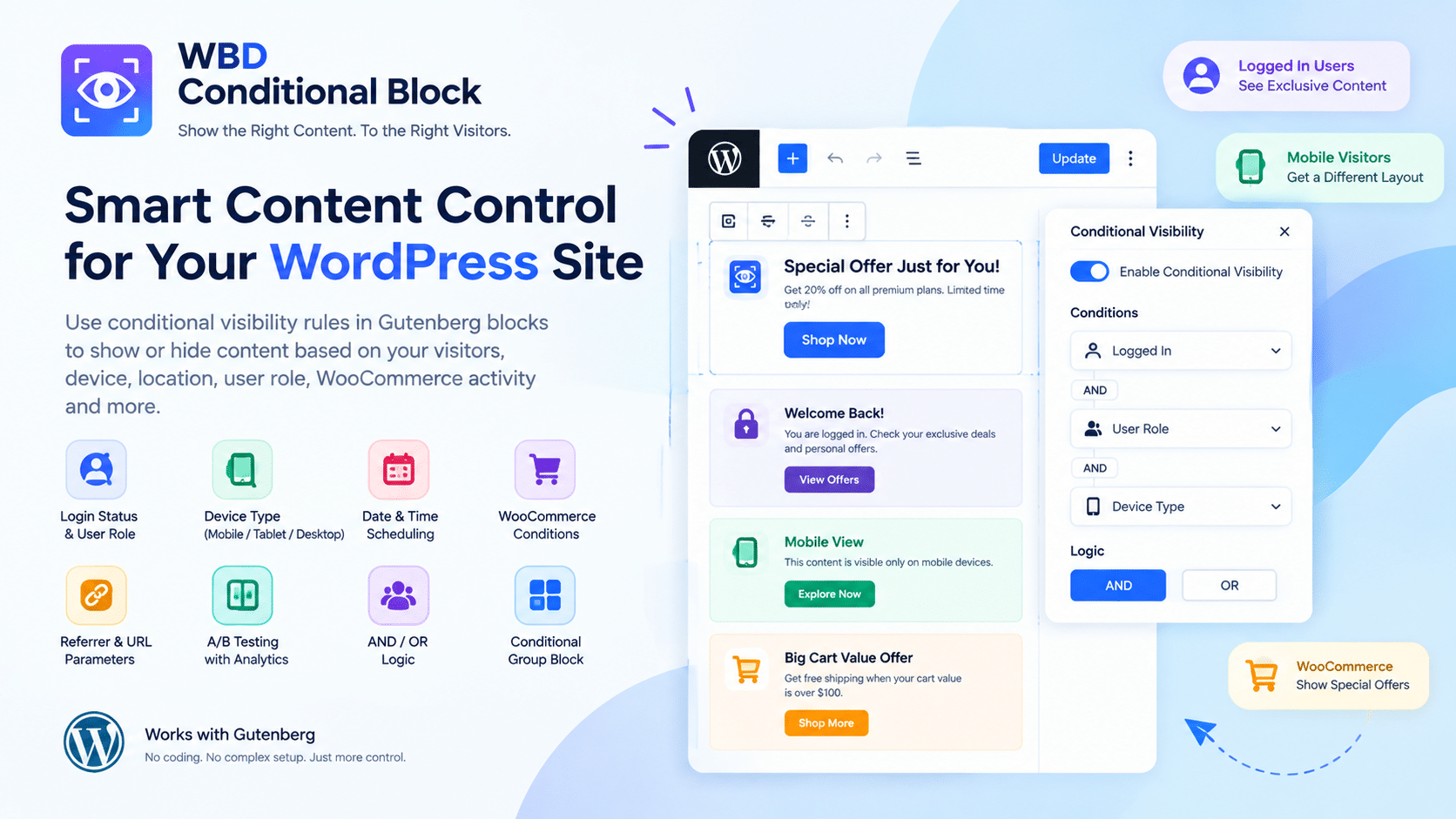
WBD Conditional Block adds a Conditional Visibility panel to the block settings sidebar. You select a block, enable the feature, choose your conditions, and decide whether the rules should use AND or OR logic.
This means you can control the visibility of existing blocks rather than replacing your website builder or adding a separate page-building system.
What Conditions Can You Use?
A major advantage of conditional content is that different types of visitor information can be used to determine whether a block appears.
WBD Conditional Block currently supports conditions including:
Login Status and User Role
Show content differently for logged-in and logged-out visitors.
You can also target WordPress roles such as Administrator, Editor, Subscriber, WooCommerce Customer, or custom roles.
Device Type
Create different visibility rules for mobile, tablet, and desktop visitors.
For example, you could show a compact promotional block on mobile while displaying a larger section on desktop.
Date and Time
Schedule content for a particular date range or recurring day and time window.
This can be useful for temporary promotions, event announcements, seasonal messages, or limited-time campaigns.
WooCommerce Conditions
If you run a WooCommerce store, you can create rules based on shopping activity.
The plugin supports conditions involving cart contents, cart value, purchase history, lifetime spend, and customer status.
Can You Combine Multiple Conditions?
Yes.
WBD Conditional Block supports AND and OR logic, allowing you to create more specific visibility rules.
For example:
AND: Show a special offer only when a visitor is logged in AND has a WooCommerce customer role.
OR: Show a campaign message when a visitor comes from Google OR Facebook.
Combining conditions gives you more control without requiring custom PHP code.
What Is the Conditional Group Block?
Sometimes you do not want to apply a rule to just one block.
For example, a promotional section may contain a heading, paragraph, image, and button. Instead of configuring each block individually, you can use the Conditional Group block and place the related blocks inside it.
Then you can apply one set of visibility rules to the entire group.
Can You A/B Test Gutenberg Content?
Yes. WBD Conditional Block includes an A/B Test Variant condition.
It can split visitors between two versions of a block and provide built-in analytics showing how often variants are displayed. This can be useful when experimenting with headlines, promotional messages, buttons, or other content variations.
The goal is not to guess which version works better. Instead, you can use the available analytics to understand how different content versions are being displayed.
Does Conditional Visibility Slow Down WordPress?
According to the plugin’s WordPress.org documentation, its common condition checks run in PHP without database queries, while geolocation is the condition that can use an external service and is cached per visitor.
The plugin is designed as a visibility layer for existing Gutenberg blocks rather than a complete page builder or large block collection.
Who Can Use a WordPress Conditional Block Plugin?
Conditional visibility can be useful for many types of websites.
Business websites can display different messages for visitors and existing customers.
WooCommerce stores can create customer-specific promotional content.
Agencies can use conditional sections when building personalized client websites.
Content websites can schedule announcements or display targeted messages.
Marketing teams can experiment with different versions of calls-to-action and campaign content.
Frequently Asked Questions
What is the best way to hide a Gutenberg block?
A conditional visibility plugin can add visibility rules directly to Gutenberg blocks, allowing you to show or hide content based on visitor or page conditions.
Can I show a WordPress block only to logged-in users?
Yes. WBD Conditional Block includes login-status conditions and user-role rules for controlling block visibility.
Can conditional blocks work with WooCommerce?
Yes. WooCommerce-specific conditions are included and activate when WooCommerce is installed and active.
Can I schedule Gutenberg content?
Yes. Date and time conditions can be used to control when selected blocks are displayed.
Does WBD Conditional Block work with third-party Gutenberg blocks?
The plugin is designed to work with Gutenberg blocks, including standard blocks, WooCommerce blocks, and third-party blocks.
Check Plugin : WBD Conditional Block
Make Your WordPress Content More Flexible
A modern WordPress website does not always need to show identical content to every visitor.
With conditional block visibility, you can create more targeted experiences while continuing to use the Gutenberg editor you already know. From login-based content and WooCommerce offers to scheduled promotions and A/B testing, conditional rules can give you more control over individual sections of your website.
WBD Conditional Block brings these controls directly into the WordPress block editor, while keeping the workflow focused on the blocks already used on your website.
If you want more control over WordPress block visibility, conditional content, WooCommerce displays, or Gutenberg A/B testing, WBD Conditional Block is worth exploring.