Build Responsive Pricing Tables in Gutenberg – Boost Conversions
How to Create a High-Converting Pricing Page in Gutenberg
Your pricing page might be the single most important page on your website. It’s where visitors stop browsing and start deciding and if that decision feels confusing, cluttered, or untrustworthy, they leave without buying. A well-designed Pricing Table removes that friction. It lets people compare plans at a glance, builds trust in your offer, and quietly nudges them toward the plan you actually want them to choose.
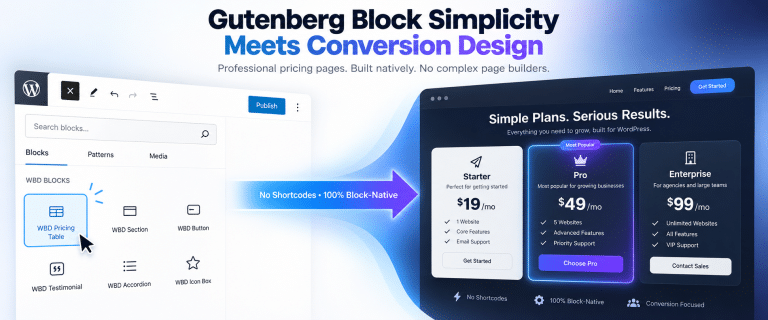
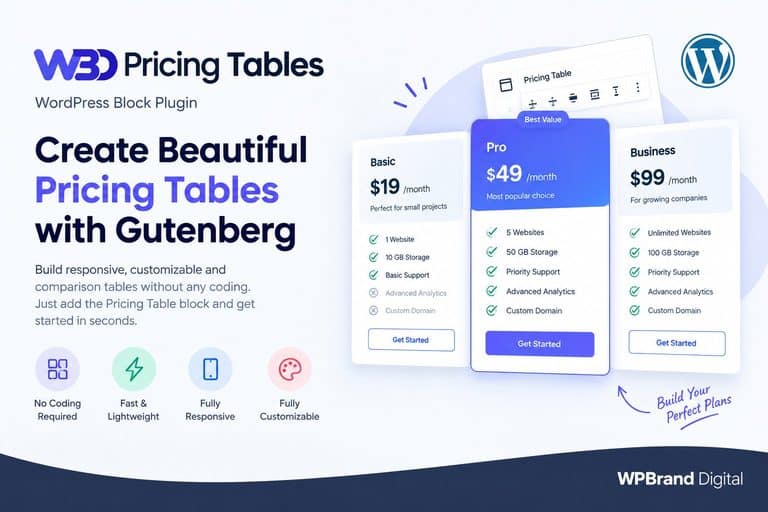
That’s exactly what WBD Pricing Table is built for. It’s a native Gutenberg block that lets you design clean, responsive, high-converting pricing tables directly inside the WordPress Block Editor, no shortcodes, no page builders, and no coding required.
In this guide, we’ll walk through why pricing tables matter, what makes WBD Pricing Table different, and how to build one in minutes.
Why a Good Pricing Table Matters
A pricing table isn’t just a list of numbers, it’s a conversion tool. When it’s done well, it:
- Speeds up plan comparison: Visitors can scan features side by side instead of digging through paragraphs of text.
- Builds trust: A clean, professional layout signals that your product is well-made and worth paying for.
- Reduces decision friction: Clear structure means fewer visitors abandoning the page out of confusion.
- Highlights the right offer: A well-placed “Most Popular” badge can guide buyers toward your best-value plan and lift average order value.
- Improves conversion opportunities: Every second a visitor spends confused is a second closer to bouncing. A tidy pricing table keeps them moving toward checkout.
In short: a better pricing table can pay for itself with your very next customer conversion.
The Problem With Default WordPress Pricing Tables
Most default WordPress setups weren’t built with pricing pages in mind. To get a decent-looking table, you’re often stuck with one of these options:
- Manually coding tables with custom CSS
- Relying on shortcodes that require memorization or constant copy-pasting
- Installing a heavy page builder just to style one section of your site
Each of these adds friction, slows down your workflow, and – in the case of bloated builders – can even hurt your page speed and SEO. Default WordPress tables often look clunky, require custom CSS, or depend on shortcodes and page builders. WBD Pricing Table fixes that in a few clicks, bringing a clean, modern experience directly into Gutenberg.
What Is WBD Pricing Table?
WBD Pricing Table is a lightweight, Gutenberg-native block plugin that lets you build professional pricing sections without leaving the WordPress editor. Instead of pasting shortcodes or switching between multiple tabs, you add a block, fill in your plans, and watch the table take shape in real time – exactly as it will appear on your live site.
It’s designed for freelancers, agencies, startups, SaaS companies, and small business owners who want agency-quality pricing pages without hiring a developer.
Why Use a Gutenberg Pricing Table Block?
Building your pricing table WordPress section as a native Gutenberg block – rather than a shortcode or third-party builder – comes with real advantages:
- No short codes needed: Build tables visually, directly inside the block editor.
- No external builder required: Skip installing a heavy page builder just for one section of your site.
- True live preview: What you see in the editor is exactly what visitors see on the front end – no guesswork, no constant tab-toggling.
- Sidebar controls: Adjust columns, colors, badges, and buttons from the native inspector panel.
- Clean, block-based implementation: No page bloat, no unnecessary scripts weighing down your site.
- Faster editing workflow: Go from a blank page to a published pricing table in minutes, not hours.
Key Features of WBD Pricing Table
1. Ready-to-Use Pricing Templates
Skip the blank-page problem. Pre-designed templates let you launch a professional pricing table section in under five minutes – just drop in your plans and pricing.
2. 1 – 4 Column Layouts
Whether you offer a single plan or a full tiered lineup, you can build layouts from one to four columns depending on your business model.
3. Featured / “Recommended” Plan Badge
Toggle a “Most Popular” or “Recommended” ribbon on any plan directly from the block controls. This simple visual cue steers buyers toward your highest-value offer and can meaningfully lift average order value.
4. Unlimited Feature Lists
Add as many features as you need per plan, each with custom checkmark or cross icons, so visitors can instantly see what’s included and what isn’t.
5. Monthly vs Annual Toggle
Support recurring billing toggles that let visitors switch between monthly and annual pricing. This keeps your table uncluttered while encouraging longer-term (and more profitable) annual sign-ups.
6. Custom CTA Buttons
Customize button text, destination URLs, and new-tab behavior for every plan, so each CTA fits naturally into your funnel.
7. Complete Color Customization
Adjust header colors, text colors, button styles, and featured-plan accents to match your brand – no CSS required.
8. Responsive Pricing Tables
Plans reformat and stack automatically on smaller screens, so your table looks great on any device without manual adjustments.
9. Real-Time Gutenberg Preview
See exactly what your visitors will see, as you build it – a true “what you see is what you get” editing experience.
10. Lightweight, Clean Code
Built to load fast and stay out of the way. WBD Pricing Table won’t weigh down your site speed or hurt your SEO performance the way bloated builder add-ons can.
How to Create a Pricing Table in Gutenberg
Getting a professional pricing section live takes just a few steps:
- Install WBD Pricing Table from your WordPress dashboard.
- Add the Pricing Table block to your page inside the Gutenberg editor.
- Choose your layout or template as a starting point.
- Add your plans – names, prices, features, and CTA buttons.
- Highlight your recommended plan with the featured badge.
- Customize colors and styling to match your brand using the sidebar controls.
- Publish – your responsive, high-converting pricing table is live.
That’s it. Zero coding, zero shortcodes, 100% native block performance.
Pricing Table Best Practices for Higher Conversions
A great plugin still needs a smart layout behind it. Keep these tips in mind as you design:
- Keep plan choices simple – three core options is usually the sweet spot.
- Make the recommended plan visually obvious with a badge or accent color.
- Keep feature wording short so it’s easy to scan at a glance.
- Use clear, action-oriented CTA buttons (“Start Free Trial” beats “Submit”).
- Design for mobile first, since a large share of buyers will compare plans on their phone.
- Show meaningful differences between plans so the upgrade path feels obvious.
Before vs After: From Cluttered Pricing to Conversion-Focused Design
Before: Plain text pricing, inconsistent formatting, no visual hierarchy, and features buried in paragraphs – visitors have to work to understand what they’re paying for.
After: Clean columns, a highlighted recommended plan, scannable feature lists with icons, clear CTA buttons, and a layout that adapts perfectly to mobile. The difference isn’t just aesthetic – it’s the gap between a visitor leaving confused and a visitor clicking “Buy Now.”
WBD Pricing Table vs Traditional Shortcode Plugins
| Traditional Approach | WBD Pricing Table |
| Shortcodes | Native Gutenberg block |
| Extra editor switching | Edit directly in Gutenberg |
| Limited live preview | Real-time preview |
| Developer styling often needed | Visual sidebar controls |
| Heavy builder dependency | Lightweight block experience |
| Manual responsive adjustments | Automatic responsive layout |
Ditch slow short code plugins – a modern, block-based pricing comparison table is built for how WordPress works today, not how it worked a decade ago.
Who Should Use the WBD Pricing Table?
WBD Pricing Table fits any business that needs to present plans, packages, or pricing tiers clearly:
- SaaS businesses
- Freelancers
- Agencies
- Startups
- WooCommerce stores
- Service businesses
- Subscription businesses
Pricing Table Use Cases
- SaaS subscription plans
- Agency service packages
- Hosting plans
- Membership tiers
- Product pricing pages
- Service packages
- Software licenses
FAQs About the WBD Pricing Table
Q: What is a Pricing Table in WordPress?
A: A pricing table is a structured layout that displays plans, prices, and features side by side, making it easy for visitors to compare options and choose the right one.
Q: Can I create a Pricing Table directly in Gutenberg?
A: Yes. WBD Pricing Table is a native Gutenberg block, so you can build and edit your pricing table without leaving the WordPress Block Editor.
Q: Does WBD Pricing Table require shortcodes?
A: No. There are no shortcodes to copy, paste, or memorize – everything is built visually using block controls.
Q: Is WBD Pricing Table responsive?
Yes. Pricing plans automatically reformat and stack cleanly on smaller screens without any manual CSS work.
Q: Can I highlight a recommended plan?
A: Yes. You can toggle a “Most Popular” or “Recommended” badge on any plan directly from the block sidebar.
Q: How many columns can I create?
A: You can create layouts with 1 to 4 columns, depending on how many plans you want to display.
Q: Can I customize pricing table colors and buttons?
A: Yes. Header colors, text colors, button styles, and featured-plan accents are all customizable from the sidebar – no code required.
Q: Does it work with any WordPress theme?
A: Yes. As a lightweight, clean-coded Gutenberg block, WBD Pricing Table is built to work smoothly with standard WordPress themes without adding page bloat.